SAML & SCIM Protocols
Last updated: February 9, 2026
ModernLoop supports Single Sign-On (SSO) authentication via SAML 2.0, allowing users to access ModernLoop securely and conveniently using their existing domain credentials. This means users can log in with the same username and password they use across your organization's tools, eliminating the need for additional login credentials and streamlining the authentication process.
ModernLoop does not support earlier versions of SAML. If your organization uses Okta, please refer to our📄 Okta Single Sign-on (SAML)Documentation.
ModernLoop works with your IT team to build a custom connection in your preferred SSO provider.
For further assistance or to start the integration process, please contact your Customer Success Manager.
Pricing
SSO is an optional, paid add-on service.
If you’re not currently utilizing SSO with ModernLoop but are interested in exploring this feature, please contact your Account Executive or Customer Success Manager for more information.
Creating a Custom SAML Configuration
If you are interested in setting up a custom SAML/SCIM Protocol, please reach out to your CSM. They will collaborate with your IT team to build a custom connection.
Steps to Set Up a Custom SAML Configuration:
Create a Custom App in Your Identity Provider:
Generate a Metadata URL or Metadata XML in your Identity Provider.
Share the Metadata with your CSM.
ModernLoop Configuration:
Using the Metadata provided, ModernLoop will configure the necessary settings, including SSO URLs and signing certificates.
ModernLoop will then provide you with the following information to complete the connection:
Entity ID:
Example:
urn:auth0:modernloop:{{CONNECTION_NAME}}
Sample:
urn:auth0:modernloop:acme-company
Reply/ACS URL:
Example:
https://auth.modernloop.io/login/callback?connection={{CONNECTION_NAME}}
Sample:
https://auth.modernloop.io/login/callback?connection=acme-company
Set Up Required Attributes in Your Identity Provider:
Ensure the following attributes are configured to pass to ModernLoop:
email: The user’s primary email address.
given_name: The user’s first or given name.
family_name: The user’s last or family name.
Setting Up SCIM Provisioning (Optional)
ModernLoop supports both Just In Time (JIT) provisioning and manual provisioning for all SAML SSO configurations. Additionally, you can enable automatic provisioning via SCIM for enhanced functionality.
Key Features of SCIM Provisioning:
User Creation: ModernLoop creates users using the information provided in the SAML response.
User Updates: Changes made to user profiles in the identity provider are reflected the next time the user logs in.
Automatic Provisioning via SCIM: SCIM immediately pushes updates, including user creation and deactivation.
Supported Identity Providers:
SCIM provisioning is available for both standard and custom SAML configurations with your preferred identity provider.
Supported Endpoints
ModernLoop supports a limited set of SCIM endpoints. All SCIM functionality lives at the base endpoint of https://api.modernloop.io/org/scim/v2/
Description | Method | Endpoint |
List Users |
|
|
Retrieve User |
|
|
Create User |
|
|
Update User |
|
|
Update User |
|
|
List Groups |
|
|
SCIM Attributes
The following SCIM attributes, if provided by your SCIM provider, are mapped directly to the ModernLoop database. The minimum required attributes are familyName, givenName, and emails.
Attribute | Description |
userName | Mapped to the |
name | Mapped to the |
familyName* | The user’s last name (e.g., "Jensen" in "Ms. Barbara Jane Jensen, III"). |
givenName* | The user’s first name (e.g., "Barbara" in "Ms. Barbara Jane Jensen, III"). |
emails* | Mapped to the |
displayName | Mapped to the |
locale | Mapped to the |
active | Denotes if the user is active ( |
modernloopRole | Custom property for ModernLoop roles ( |
SCIM Role Management
SCIM-enabled organizations can control where user roles are managed, either directly in ModernLoop or through your SCIM identity provider.
Important note about role management
Role management can only be handled in one place at a time—either via SCIM or directly in ModernLoop.
Switching the Manage user roles via SCIM toggle will override your previous role management method. Any role updates must then be made in the newly selected system (SCIM provider or ModernLoop), and changes made in the other location will no longer apply.
Where to find this setting
Navigate to Settings → Members.
At the top of the Members page, you’ll see a banner confirming that SCIM is enabled.
Use the toggle labeled Manage user roles via SCIM to choose how roles are managed.
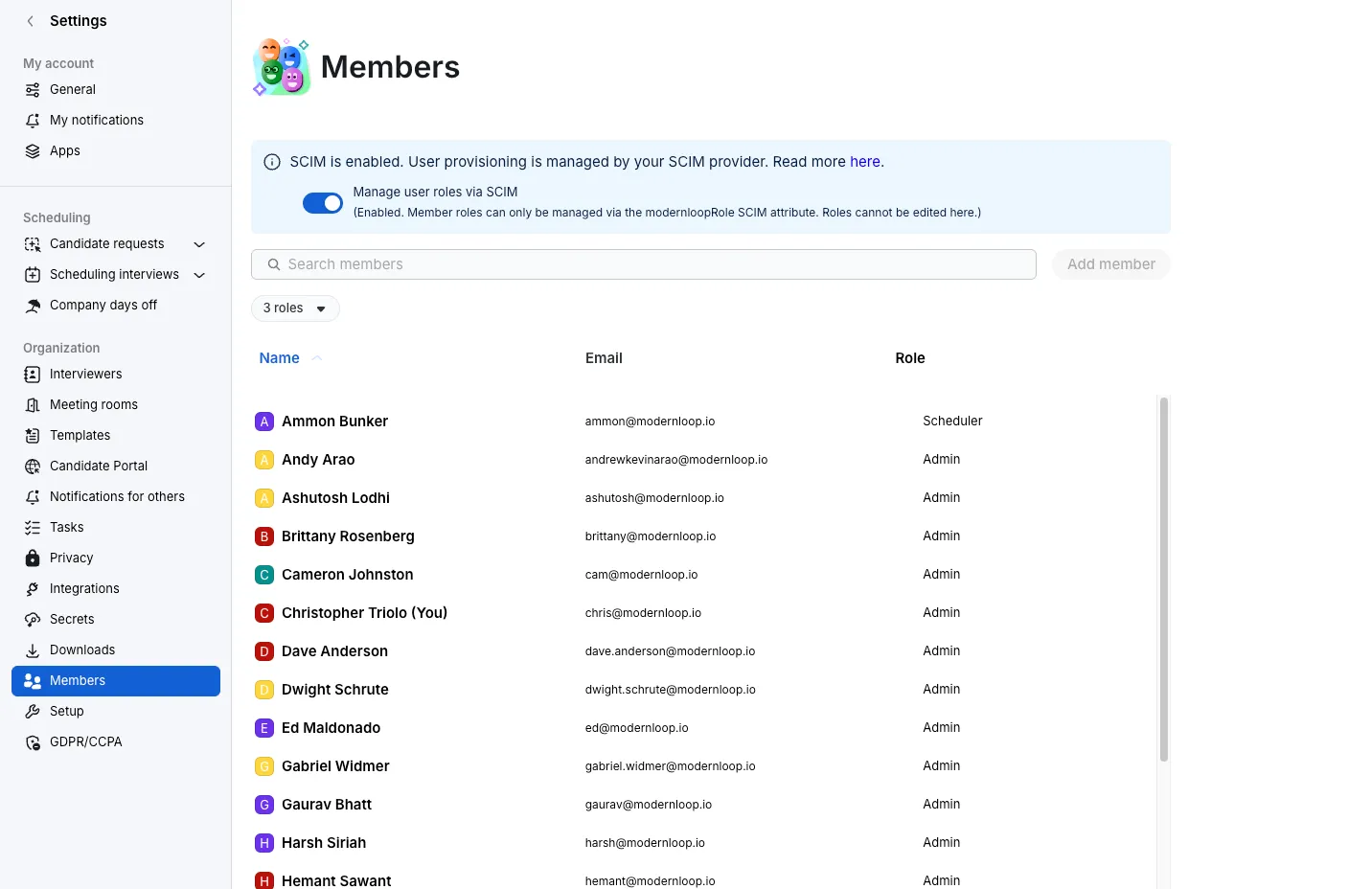
Manage roles via SCIM (enabled)
When Manage user roles via SCIM is turned on:
User roles are controlled entirely by your SCIM provider (for example, Okta or Azure AD).
Roles are synced to ModernLoop using the
modernloopRoleSCIM attribute.Roles cannot be edited directly in ModernLoop.
The Add member and role-editing actions in the Members page are disabled.
This option is ideal for teams that want all access and permissions managed centrally through their identity provider.
Manage roles in ModernLoop (disabled)
When Manage user roles via SCIM is turned off:
User provisioning is still handled by SCIM.
Roles can be updated directly within ModernLoop.
Admins can manage roles from the Members table without relying on SCIM role attributes.
This option is helpful if you want to keep provisioning automated but manage roles more flexibly within ModernLoop.