Interviewer Properties Sync
Last updated: February 9, 2026
ModernLoop allows you to sync interviewer data automatically from various sources, including Google, Microsoft, Okta, and Azure, through SCIM and directory sync integrations. This feature eliminates the need to manually upload CSVs to manage interviewer data, ensuring that your team always has the most up-to-date information.
This article explains how to manage and sync interviewer information such as title, manager, and location amongst other fields from different data sources and what to expect when setting up or modifying these configurations.
Interviewer Properties via Directory Sync (Google/Microsoft)
ModernLoop supports syncing certain properties from your Directory (Google or Microsoft), so that these properties can stay in sync with what is available on your Google or Microsoft. Properties that can be directory synced are:
Title
Manager
Location
Department
Country
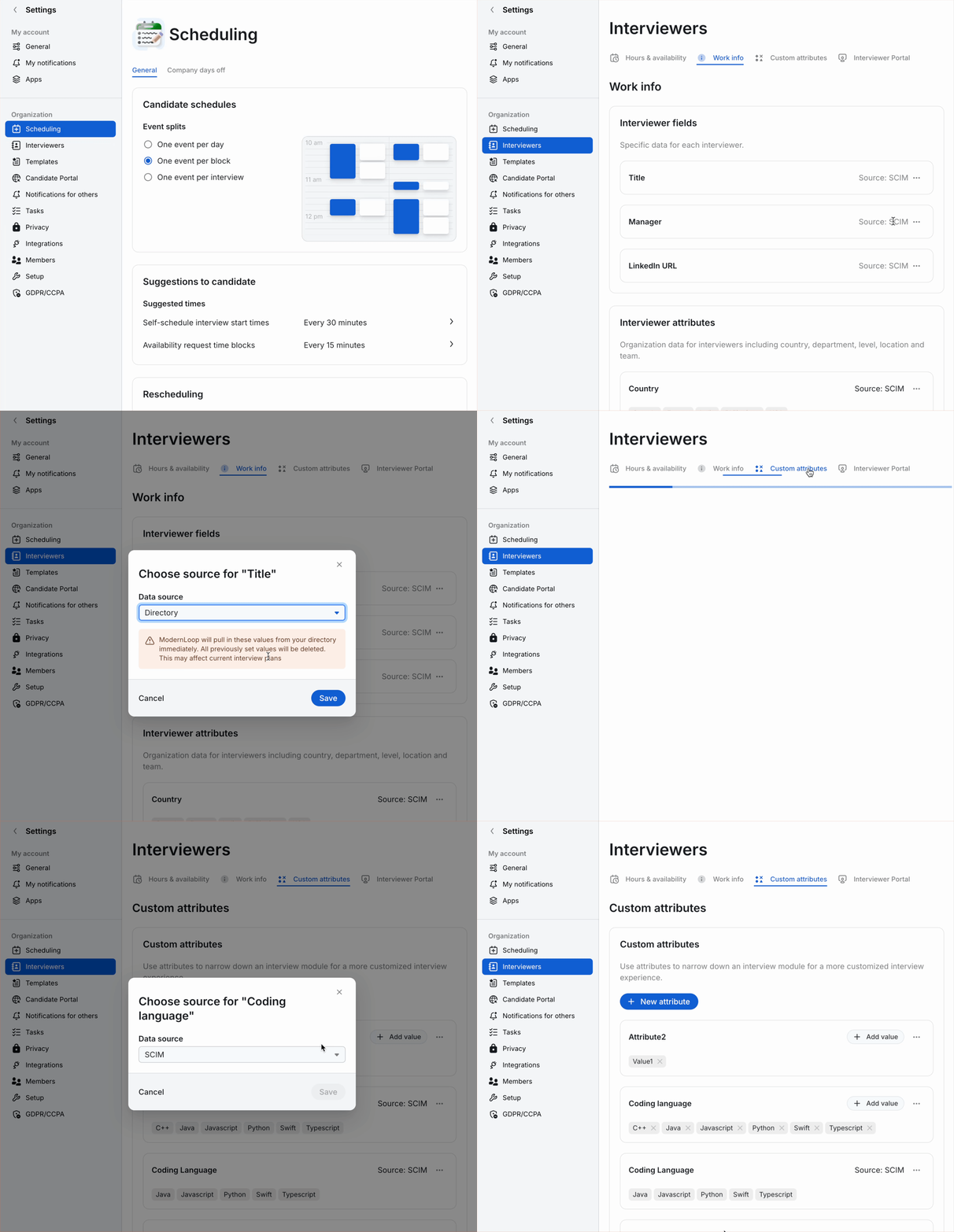
On ModernLoop, set relevant fields to pull from your Directory
In ModernLoop, navigate to Organization settings → Interviewers → Work info to set Interviewer fields and Interviewer attributes to
Directorysource to allow these fields to accept values from SCIM
From the ellipsis, select Change source.
Select
Directoryfrom the drop-down menu.
Data from your Directory will start to sync over immediately.
Interviewer Properties via SCIM Push
With the introduction of the Interviewer Portal, ModernLoop now supports adding interviewers as users. Organizations can use the SCIM (System for Cross-domain Identity Management) standard to sync interviewer data with ModernLoop. This allows you to pass various user attributes, including additional custom fields, seamlessly into the system. Properties that can be directory synced are:
Title
Manager
Linked In Url
Location
Department
Team
Level
Country
…and any custom attributes
On ModernLoop, set relevant fields to SCIM
SCIM will only appear if your organization is using SCIM with ModernLoop. Directory will not appear as an option for LinkedIn URL, Level, or Custom Attributes
In ModernLoop, navigate to Organization settings → Interviewers → Work info to set Interviewer fields and Interviewer attributes to
SCIMsource to allow these fields to accept values from SCIM
From the ellipsis, select Change source.
Select a source from the drop-down menu.
If you have pre-existing Custom Attributes that you want to allow SCIM to sync, please also set them to SCIM source type by navigating to Organization settings → Interviewers → Custom attributes and changing their source types. New Custom Attributes sent by SCIM will automatically be created and set to SCIM source type.
On your SCIM Identity Provider, set up the properties
ModernLoop accepts standard and custom attributes for each interviewer using their external name and external namespaces. Please use the following external name and external namespace for each attribute:
External NameExternal Namespace | |
|
|
|
|
|
|
|
|
|
|
|
|
|
|
|
|
custom |
|
Identity Provider Specific Guides:
Namespaces:
ModernLoop-defined Properties
For ModernLoop defined interviewer properties like Profile Fields or System Attributes please use the namespace:
urn:scim:schemas:extension:modernloop:1.0:Profile
Customer-defined Properties
For customer defined-properties like “Custom Attributes”, please use the namespace:
urn:scim:schemas:extension:modernloop:1.0:CustomAttribute
ModernLoop will only accept properties in if they are in the proper namespace.
Interviewer Properties via Manual Updates
Reminder: ModernLoop has multiple ways to update an Interviewers information:
As an Admin or Scheduler, go to their Interviewer Directory page and update their attributes directly.
Enable Interviewer Portal and allow the Interviewers to change their properties themselves. See:
Use our spreadsheet (CSV) upload to Bulk Upload interviewer data. See:📄 Work Info Bulk Import
Important: When using CSV uploads, column headers are case-sensitive. Ensure you use the exact column names from the template (e.g., "LinkedIn" not "Linkedin") to avoid import failures.
CSV imports only work for fields and attributes set to “Manual” source. Any attributes set to sync from SCIM or Directory will be ignored during the CSV upload process.
Appendix
Automatic Data Management
When a directory sync or SCIM provision/update occurs, ModernLoop will remove any non-manual attributes with no associated interviewers.
If an employee is disabled in the directory, all their attributes will be cleared.
Switching an attribute from non-directory to directory will delete all current values and resync automatically.
Attribute Source Options
For each interviewer attribute, you can select its source type:
Manual
Editable by admins and interviewers (interviewers can only edit fields enabled through Organization settings → Interviewers → Interviewer Portal).
SCIM and Directory values are ignored.
If switched to Manual from SCIM or Directory, existing values will remain unchanged.
Directory (Google or Microsoft)
Automatically syncs from your directory system.
Not editable in ModernLoop by admins or interviewers.
SCIM values are ignored.
When switching to Directory from SCIM or Manual, previously set values are deleted and resynced.
LinkedIn, Level, and Custom attributes cannot be synced from the directory.
SCIM (Okta, Azure, etc.)
Automatically syncs from SCIM.
Not editable in ModernLoop by admins or interviewers.
Directory values are ignored.
When switching to SCIM from Directory or Manual, values will be updated automatically and preserved.
Field/ Attribute | Source: Manual | Source: SCIM | Source: Directory |
title | ✅ YES | ✅ YES | ✅ YES |
manager | ✅ YES | ✅ YES | ✅ YES |
linkedin_url | ✅ YES | ✅ YES | ❌ NO |
location | ✅ YES | ✅ YES | ✅ YES |
department | ✅ YES | ✅ YES | ✅ YES |
team | ✅ YES | ✅ YES | ❌ NO |
level | ✅ YES | ✅ YES | ❌ NO |
country | ✅ YES | ✅ YES | ✅ YES |
custom | ✅ YES | ✅ YES | ❌ NO |