Greenhouse Harvest API V3 Integration
Last updated: September 4, 2026
ModernLoop now supports Greenhouse Harvest V3, bringing improved performance, stronger security, and a more consistent API structure to your integration.
This update is designed to be seamless, with no disruption to your current workflows, while unlocking important enhancements behind the scenes.
Why This Update is Happening
Greenhouse is requiring all customers and partners to migrate to Harvest API V3 and will be deprecating Harvest API V1/V2 (the current integration that uses an org-wide API key).
To ensure continued functionality of your ModernLoop + Greenhouse integration, setting up your team's Harvest V3 integrations will be required.
What Do I Need To Do?
IMPORTANT - Please complete these steps by July 7th, 2026 to avoid disruption to your Greenhouse integration.
Summary:
Set up your organization's Harvest V3 integration
done once for your entire organization
must be done by a Greenhouse Site Admin
Set up your personal Harvest V3 integration
must be done by all schedulers and admins in your organization
Steps to set up the Harvest V3 integration
Step 1: Configure the Harvest V3 integration at the organization level
The organization-level integration must be set up with a Greenhouse user that has Site Admin permissions.
If you are not a Greenhouse Site Admin, please skip this step and continue to Step 2 for authorizing Harvest V3 at the individual level.
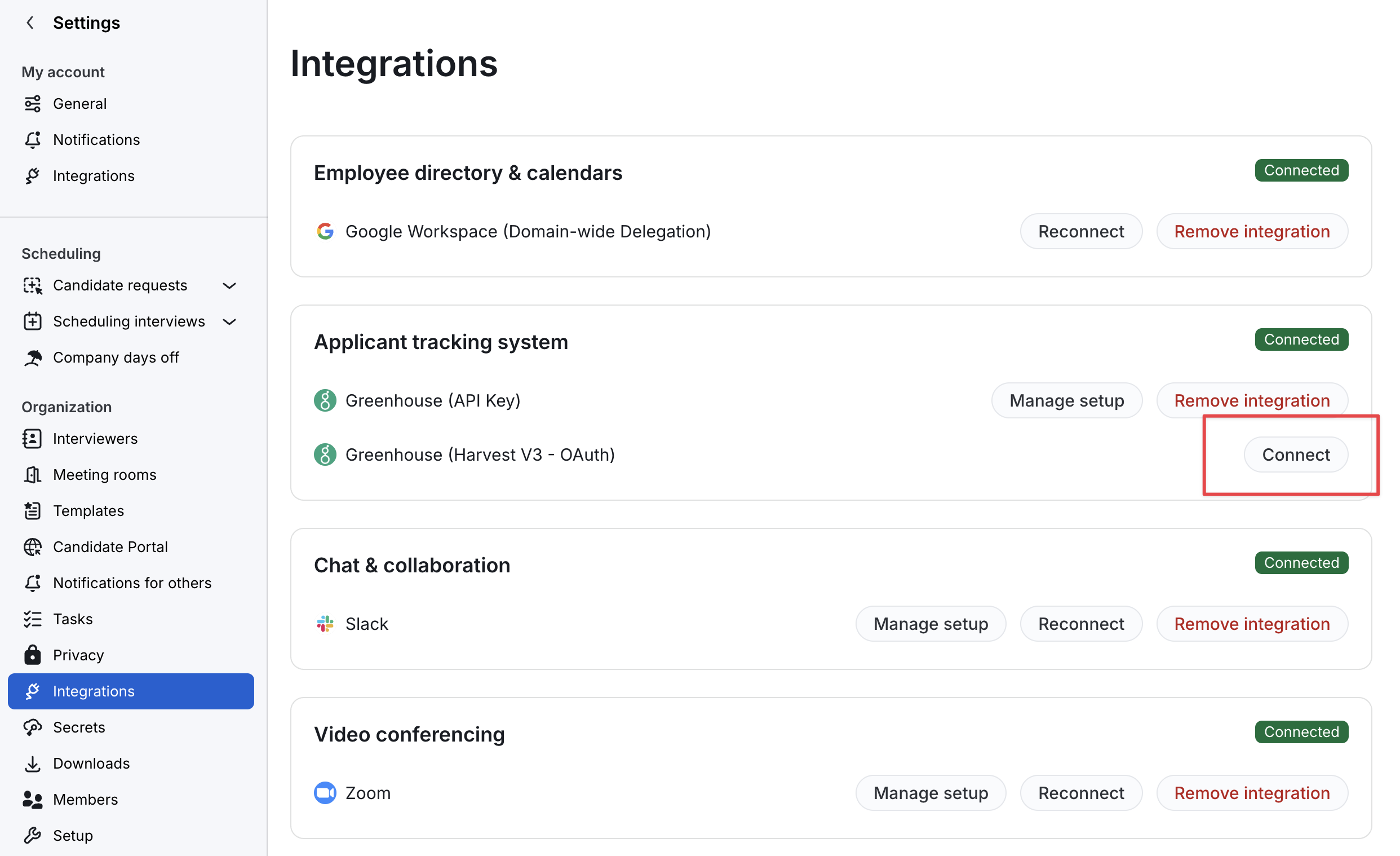
In ModernLoop, navigate to Settings -> Workspace -> Workspace integrations
Click Connect next to Greenhouse (Harvest V3 - OAuth)
(or Reconnect if you're re-doing this setup)
Enter your email address and click Log in to Greenhouse
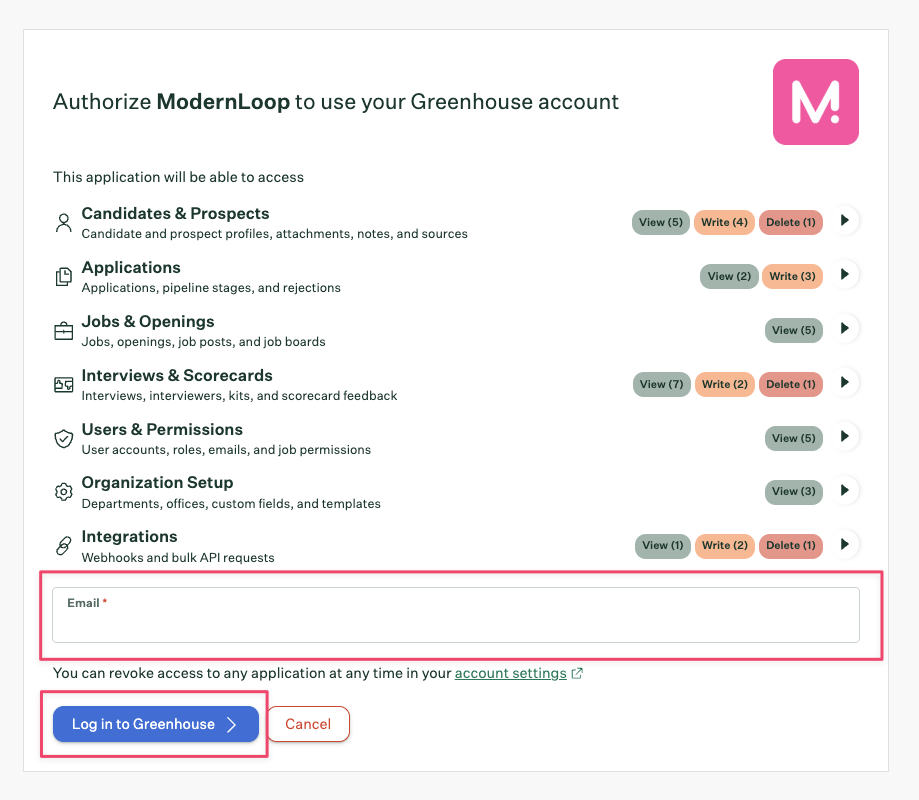
Log in to Greenhouse
Select Authorize using a service account, then click Authorize
If you do not see the Authorize using a service account checkbox, your Greenhouse user does not have Site Admin permissions and you won't be able to set up your organization's integration. You can still set up your personal integration.
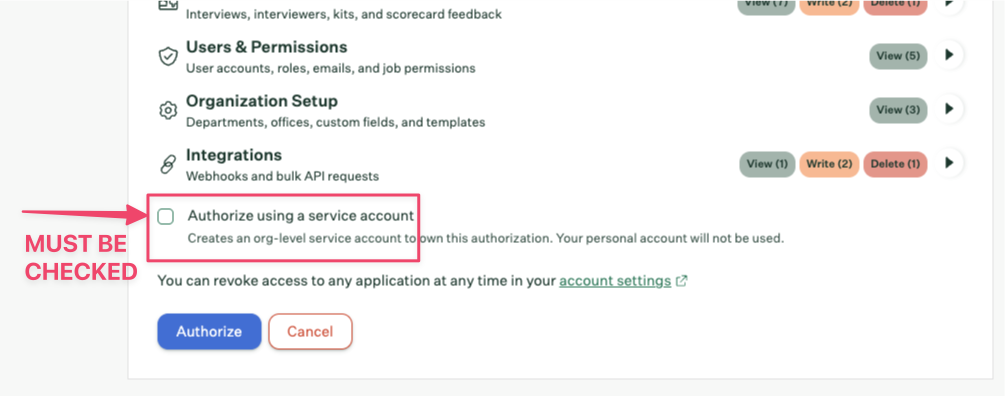
After authorizing, you'll be redirected back to ModernLoop. If you encounter any errors when being redirected back to ModernLoop, please refer to the Common Errors section at the bottom of this article for remediation steps.
Step 2: Authorize the Greenhouse integration at the personal level
To ensure scheduling actions are correctly attributed to you in Greenhouse metrics, connect your personal account as well:
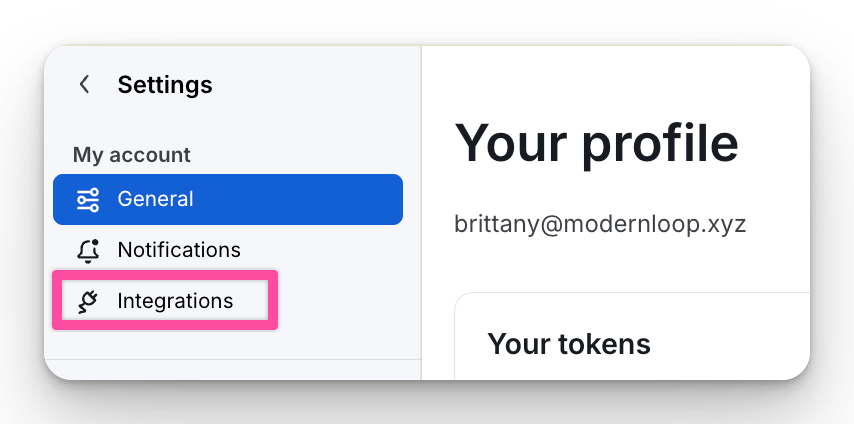
Navigate to Your account → Personal Preferences
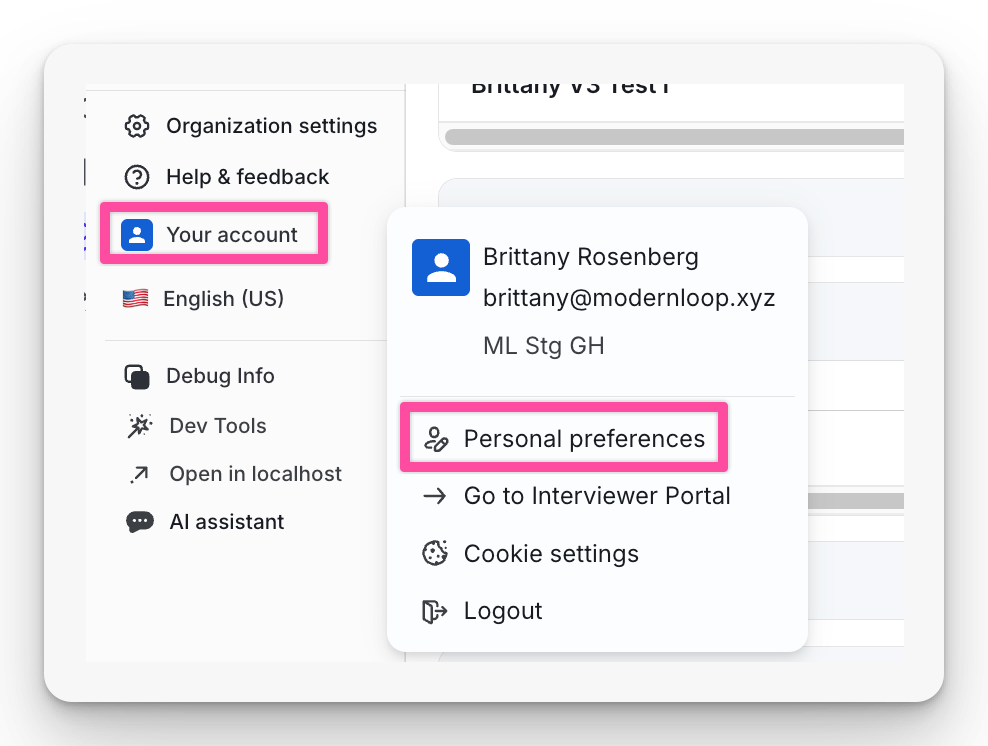
Select the Integrations tab
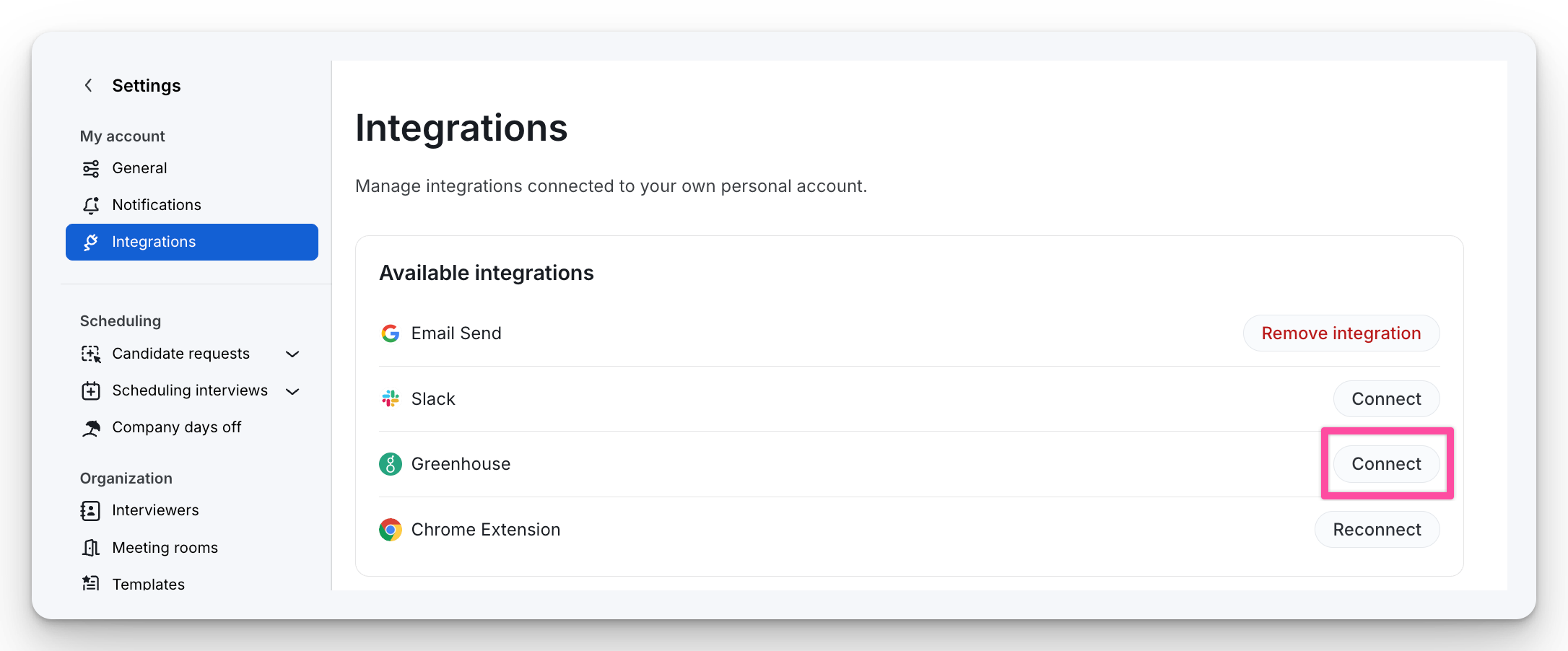
Select Connect next to Greenhouse
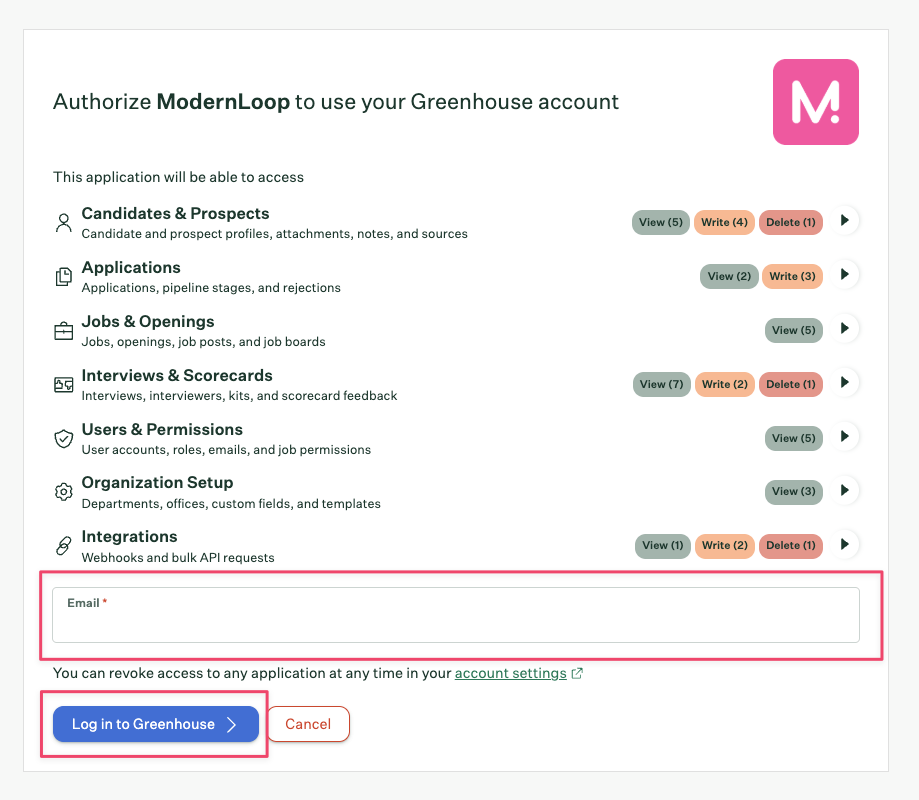
Enter your email and click Log in to Greenhouse
If you see the "Authorize using a service account" checkbox, leave it UNCHECKED, then click Authorize. If you don't see the checkbox, you can simply proceed and click Authorize.
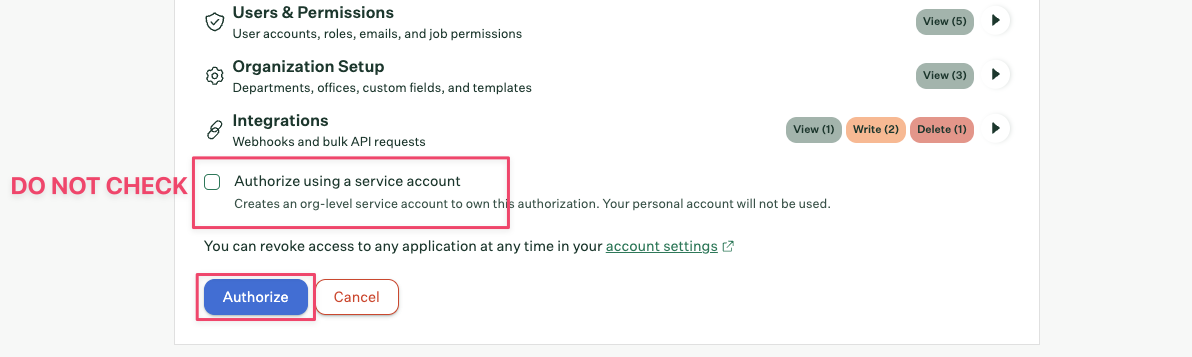
For Individual Greenhouse integrations, it's very important to leave the "Authorize using a service account" checkbox unchecked. Otherwise your personal account will not be connected to the integration you're creating.
After authorizing, you'll be redirected back to ModernLoop. If you encounter any errors when being redirected back to ModernLoop, please refer to the Common Errors section at the bottom of this article for remediation steps.
Permissions
These permissions are automatically applied when authorizing the integration. The list below is for reference only. Please reach out to the ModernLoop support team if you have any concerns about any of these permissions.
The following permissions are required for the ModernLoop integration:
List application stages
List applications
List attachments
List candidates
List default interviewers
List departments
List email templates
List interview kits
List interviewers
List interviews
List job hiring managers
List job interview stages
List job interviews
List job owners
List job post locations
List job posts
List jobs
List notes
List scorecards
List sources
List user emails
List user job permissions
List user roles
List users
Create applications
Create attachments
Create candidates
Create interviews
Create notes
Destroy interviews
Move applications
Update applications
Update candidates
Update interviews
Merge candidates
List webhooks
Create webhooks
Update webhooks
Destroy webhooks
Note: Greenhouse scopes our ability to interact with webhooks to only ones created by us, so we cannot see/interact with other webhooks you may have configured in your Greenhouse instance with other integrations.
Frequently Asked Questions
Will there be any disruption or changes to my team's processes in ModernLoop or Greenhouse due to this migration?
There are no disruptions to your team's process in either platform. The only change that occurs is that upon setting up organization-level Harvest V3, ModernLoop will start syncing candidate preferred names from Greenhouse and display them in the platform.
Do I need to do anything with my original Greenhouse API Key integration?
Please DO NOT change or remove your original Greenhouse API Key as part of this migration process. We will remove this integration for you when it is safe to do so.
Can I set up my team's organization-level integration if I'm not a Greenhouse Site Admin?
No. Only Greenhouse Site Admins can set up their team's organization-level integration.
Why am I not seeing the "Authorize using service account" checkbox while setting up my organization's V3 integration?
If you do not see this checkbox, that means you do not have Site Admin permissions in Greenhouse and therefore cannot set up (or reconnect) your organization's V3 integration. Please have a Greenhouse user with Site Admin permissions do this instead.
If I use my account to set up our organization-level integration, will all scheduling actions appear as if they were performed by me?
No. Scheduling actions are always performed using the personal integration of the user taking the action. That’s why all schedulers and admins are required to set up their own personal integrations, so that actions are correctly attributed to the individual who performed them.
What happens if the person who originally connected the organization-level integration loses access or leaves the company?
This is why we require an organization-level integration tied to a Greenhouse service account. The Greenhouse service account is not tied to any individual user and has admin-level permissions. It’s used for all non-scheduling actions, ensuring the integration continues to function even if individual users lose access or leave the organization.
What is the Greenhouse service account, and how does it work?
The service account is a Greenhouse-created account, and its sole purpose is to own the authorization to ModernLoop. The service account is not tied to any individual user, has no username or password, does not appear in the Users list in Greenhouse, and is managed entirely internally by Greenhouse.
Do I need to create the service account myself before setup?
No. There is nothing separate that needs to be done for the service account. Checking the Authorize using a service account checkbox during the setup creates the service account for you.
Who needs to set up personal Harvest V3 integrations in ModernLoop?
All users with scheduler or admin roles in ModernLoop are strongly recommended to set up their personal Harvest V3 integration.
Users with the interviewer role do NOT have a personal Harvest V3 integration to set up.
Why does ModernLoop need BOTH an organization-level integration and user-level integration?
The Harvest V3 API uses OAuth authentication for API requests, meaning every request needs to be tied to a Greenhouse user.
The organization-level integration is tied to a "service account" in your Greenhouse tenant to act as a shared connection to the API, which we use to sync all org-wide data such as jobs, candidates, interviews, etc.
(Note: even though the service account can see all org-wide data, ModernLoop still enforces job-based permissions in the platform).
The user-level integration is specifically used on API requests when ModernLoop performs actions in Greenhouse that tie back to the user (e.g. scheduling interviews, changing an application recruiter/coordinator, etc.)
What is the impact if any individual person on my team does not set up their personal Harvest V3 integration?
If any individual user does not set up their personal Harvest V3 integration in ModernLoop, they will no longer be attributed as the scheduler in Greenhouse for any schedules that were created through ModernLoop and will therefore impact their scheduling metrics. When such a user schedules in ModernLoop, Greenhouse will reflect the service user as the scheduler/organizer of the interview.
How can I track which users in my organization have set up their personal Greenhouse V3 integration?
We provide a downloadable report that shows which users in your organization have and have not completed their personal Greenhouse V3 integration setup. Please navigate to Settings -> Downloads -> Greenhouse V3 Integration -> Download CSV
Common Errors Encountered During Integration Setup

The organization-level integration failed to authorize because it was not using a service account. In this case, the integration needs to be set up with a Greenhouse user with Site Admin permissions in order to see the checkbox, and the checkbox must be checked in order to set up the integration.

A personal integration was attempting to set up a service account integration, which is invalid. Service accounts are anonymous accounts and therefore cannot be used for personal Greenhouse integrations. Please try again without authorizing a service account.

The ModernLoop user setting up the personal integration does not match the user that logged into Greenhouse. You must use a Greenhouse user that has a matching email address with your directory user (including email aliases).