Ashby Default Interview Plans
Last updated: July 21, 2026
For organizations using the Ashby integration, ModernLoop relies on the interview plans configured in Ashby to determine how candidates can be scheduled. Understanding how default interview plans work can help prevent common scheduling issues.
Candidates must be on the job's primary interview plan
ModernLoop only supports scheduling candidates who are on the job's primary interview plan in Ashby.
If a candidate is assigned to a different interview plan, ModernLoop will prevent them from entering the scheduling flow and display the following error:
Application is not on the job's primary interview plan in Ashby.
This restriction also prevents job stage changes initiated from ModernLoop.
Resolution
In Ashby, move the candidate to the job's primary interview plan. Once the candidate is on the correct plan, scheduling and stage updates can proceed.
Understanding "Ashby default interview"
The Ashby default interview option in ModernLoop is different from a job's interview plan.
Interview plan | Ashby default interview |
|---|---|
Defines the stages for a job and determines which interview plan a candidate is assigned to. | Refers to your organization's default interview type (scorecard) used when no specific interview type is selected. |
When selecting an interview type in ModernLoop, the first option is Ashby default interview.
When this option is selected:
ModernLoop intentionally does not send a scorecard ID to Ashby.
Ashby automatically assigns the organization's configured default interview type.
Do not archive the organization's default interview type
If your organization's default interview type has been archived in Ashby, scheduling interviews using Ashby default interview will fail.
You'll receive an error indicating that the default interview type must be restored.
Resolution
Restore the archived default interview type in Ashby, or choose a different interview type when scheduling.
Resetting an interview plan from Ashby
If your interview plan becomes out of sync, you can reset it from Ashby.
For Ashby organizations, Reset to Ashby plan:
Imports the current interview plan structure from Ashby.
Removes any ModernLoop-specific interview plan configuration.
Note: Interviewer assignments are not imported during a reset. After resetting, you'll need to reconfigure interviewer selections in ModernLoop.
Interview plan changes in Ashby
When an interview plan is updated in Ashby, for example when stages are added, removed, or reordered, ModernLoop automatically syncs those changes through Ashby webhooks and synchronization.
If your interview plan appears outdated:
Trigger an interview plan resync by clicking Reset to Ashby plan in the job/stage Interview plan.
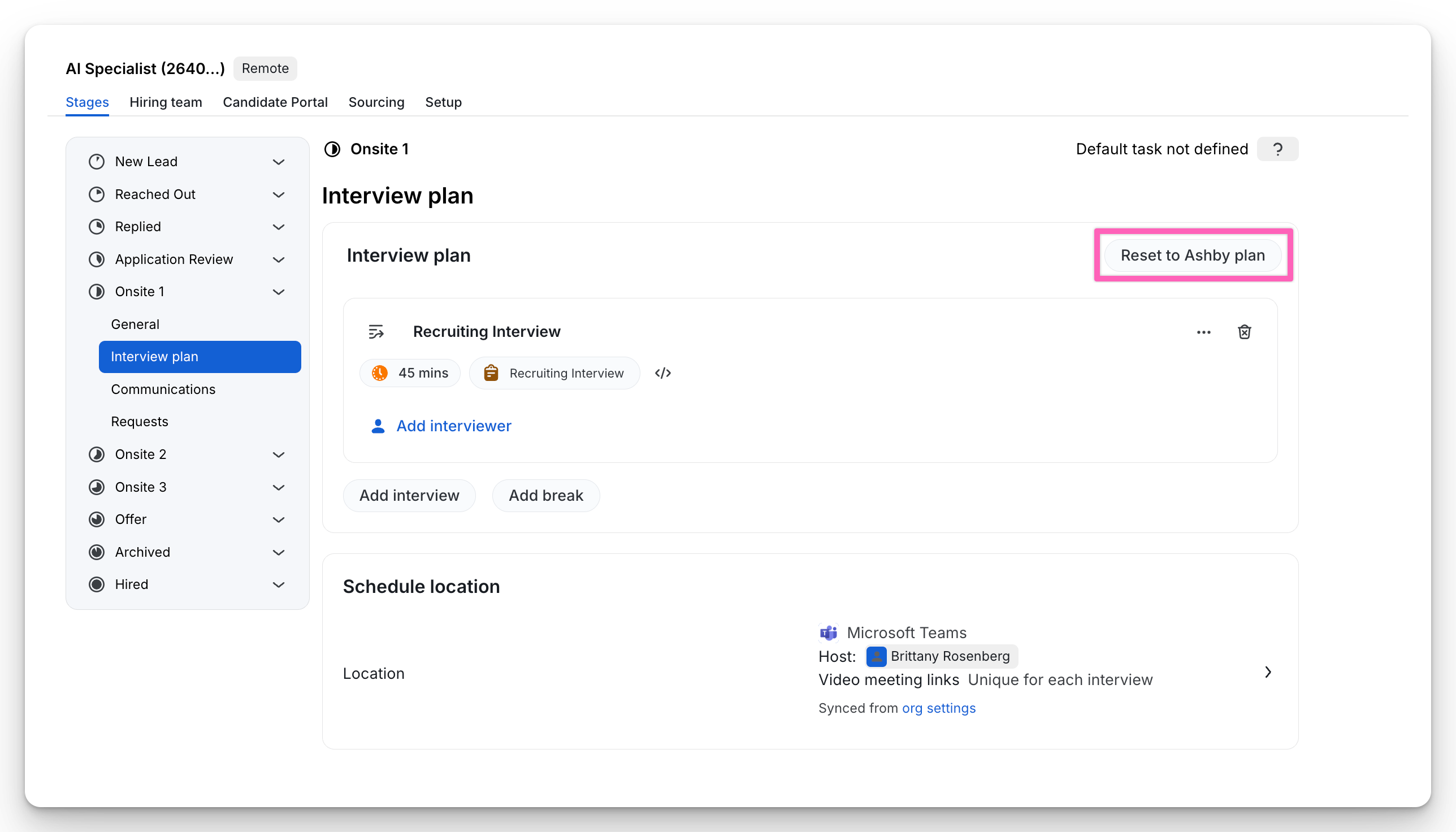
Confirm the candidate is still assigned to the job's primary interview plan in Ashby.
Troubleshooting
Issue | Recommended action |
|---|---|
Unable to schedule a candidate | Verify the candidate is assigned to the job's primary interview plan in Ashby. |
Error related to the default interview or scorecard | Confirm the organization's default interview type in Ashby has not been archived. |
Interview plan stages appear incorrect or outdated | Reset the interview plan from Ashby or trigger a job sync. |